
Are you looking for a convenient way to check your Hazeco Online Bill? You’ve come to the right place. This page lets you view your complete HAZECO electricity bill instantly — no queues, no paperwork. You can check your latest bill amount, due date, and full bill details in seconds. Whether you need a duplicate bill copy for your records or a printable version for payment, it’s all handled right here. Just enter your reference number below to get started:
To check your Hazeco online bill every month going forward, simply enter your reference number — the same one printed on your physical or previous bill. Since HAZECO was formed by splitting off from PESCO’s Hazara operations, your reference number typically follows the same 14-digit format PESCO consumers are used to. If you’re unsure where to find it, look at the top section of your bill — it’s usually printed near your name and address block.
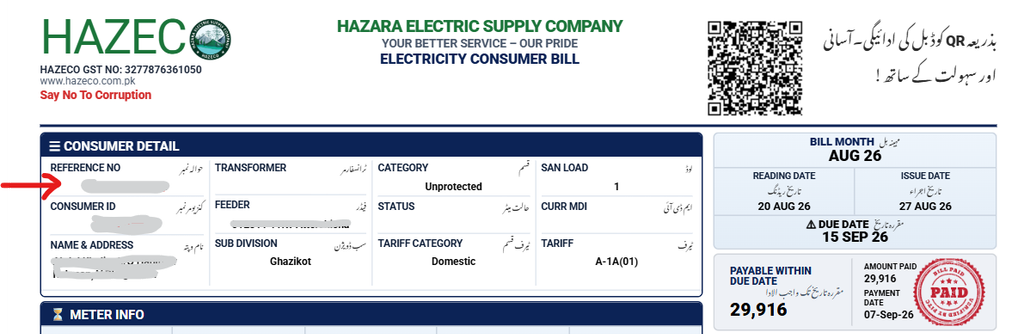
Alternatively, if you’d rather use your consumer ID, that number also appears near the top of your bill in the same general area.
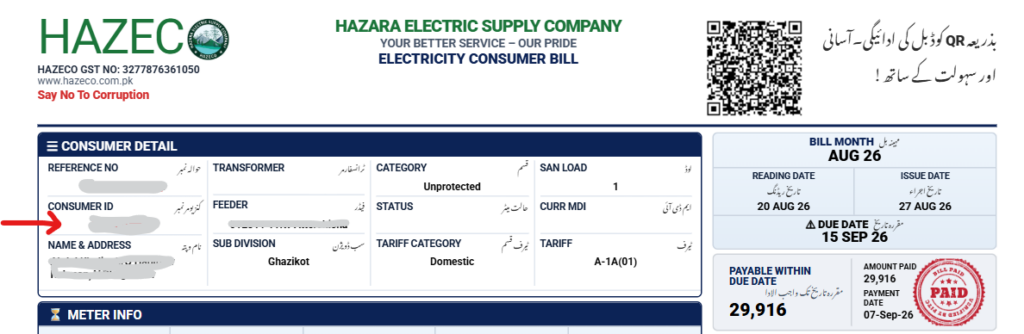
Hazeco Online Bill: What You Can See
Once you’ve entered your reference number, you can quickly check your bill amount and due date. For more detail, the full bill reveals your meter reading date, bill issue date, units consumed, and any additional charges added after the due date. Payment history is also viewable for the past several months, so you always have a clear record of what you’ve paid and when.
Hazeco Online Bill Check by Name
You cannot check your Hazeco bill by name. With thousands of HAZECO consumers across the Hazara region, many share the same name, which makes name-based lookup unreliable. There are only two accurate ways to check your bill: by consumer ID or by reference number.
Hazeco Online Bill Check by Reference Number
Your reference number is unique to your connection — no two consumers share the same one. This is why it’s the most reliable way to pull up your exact bill instantly, whether you’re checking this month’s bill or verifying a past one.
New Hazeco Bills Are Typically Available Mid-Month
If you’re worried about missing your electricity bill, don’t be. You can generate a duplicate bill anytime and avoid late payment surcharges. Just enter your reference number to access your Hazeco online bill for the current month, or check details from previous cycles.
Hazeco Peak Hours and Energy Conservation
To manage your electricity bill and support a more stable power supply across the Hazara region, it’s worth reducing consumption during peak demand hours where possible. Like other regional distribution companies, HAZECO’s peak windows generally fall in the early evening, though exact timings can shift seasonally — check your bill or HAZECO’s official notices for the current schedule.
How to Check Your Hazeco Bill Online
- Visit the Hazeco online bill page.
- Enter your 14-digit reference number (or your consumer ID).
- View your latest bill amount and due date instantly.
- Click “View Full Bill” to see complete details or download a copy.
You can also estimate your upcoming bill using a units-based calculator, and get a duplicate copy anytime by re-entering your reference number.
New Connection or Ownership Transfer
If you’ve bought a property with an existing HAZECO connection and need the bill transferred into your name, the process mirrors a new connection application. Visit your nearest HAZECO office to submit the required documents and request the name change.
Taxes and Charges in Your Hazeco Bill
Understanding what makes up your bill matters. Here’s what you’ll typically see:
1. FPA (Fuel Price Adjustment)
Reflects fluctuations in fuel prices used by power generation companies, including rental power producers.
2. TR Surcharge (Tariff Rationalisation Surcharge)
Covers the gap between NEPRA-determined tariffs and Government of Pakistan-approved tariffs.
3. FC Surcharge (Financing Cost Surcharge)
A fixed charge (commonly Rs 0.43/kWh) supporting debt servicing obligations tied to Power Holding Private Limited.
4. Deferred Amount
An optional amount you can pay in the same billing cycle or later, without incurring late fees — often spread across subsequent bills.
5. QTR Tariff Adjustment / DMC
A quarterly tariff adjustment that typically appears on your bill every three months.
Have More Questions? Contact Us
For further assistance, reach out through HAZECO’s official helpline or customer support channels.
FAQs
How do I download my Hazeco e-bill?
Enter your reference number to check your quick bill summary, then open the full bill view to download it for free.
What is the HAZECO complaint number?
Contact HAZECO’s official customer helpline for billing issues, outages, or general complaints (check HAZECO’s official website for the current number, as contact details can change post-transition).
Can I calculate my Hazeco bill online?
Yes — enter your consumed units into the bill calculator to get an estimated amount before your official bill is issued.
How can I get a copy of my Hazeco bill?
Enter your 14-digit reference number on the Hazeco bill portal to view and download a copy anytime.
Can I check my Hazeco e-bill without a reference number?
No — you can’t look up your bill using your name, CNIC, address, or meter number alone. The reference number or consumer ID is required.
How can I change the name on my bill?
Visit your nearest HAZECO office and follow the same documentation process used for new connections.
How can I check the paid status of my Hazeco bill?
This feature may not be publicly available yet. Contact HAZECO’s helpline directly to confirm payment status.
What is FPA in the Hazeco meter bill?
FPA stands for Fuel Price Adjustment — a variable charge reflecting fuel cost changes affecting power generation.
Can I check old bills online?
Older bill history may have limited availability during HAZECO’s ongoing system transition. Visit a HAZECO office for older records if they’re not shown online.
What is a HAZECO detection bill?
A “Detection Bill” is issued for cases like unauthorized electricity use, meter tampering, direct hooking, or a meter running slower than it should.
Lastly, Feel free to reach out if you have any questions or need further assistance.